Wednesday, June 27, 2018
How to Publish an Ebook Picture Book from a Mac for Nook Kindle PDF
How to Publish an Ebook Picture Book from a Mac for Nook Kindle PDF
I promised Id post the process I used to create my ebook, "Princesses, Princesses, Princesses!" for PDF download, for Kindle, for Nook. Its actually not that hard but certain steps can be tricky. Hopefully this little tutorial will help you avoid some of my mistakes. I need to thank VonLogan Brimhall for their tutorial. It got me started. It may work well for PC users, but I am an Apple girl. So there were just some parts that didnt translate well. In addition, the dimensions they proposed for the devices didnt work for me when importing to InDesign and to the devices from there. And finally, there were a few easier tricks I learned in the process.
Remember, Kindle and Nook both have free apps for iphone and ipad and in the android market so anything sold by them can be read on those devices as well. You arent limited to just kindle or nook users.
Heres what programs I used...so if you dont have these 2 programs, this tutorial wont be super useful to you. Im sorry.
- Adobe Photoshop (any version should do- I have CS5)
- Adobe InDesign (version CS5 is what I used, I dont know if earlier versions work, I think CS4 does)
- Adobe Acrobat (I used Pro, youll need more than just the reader)
Or download a PDF of this entire post, HERE.
Creating a Nook picture book
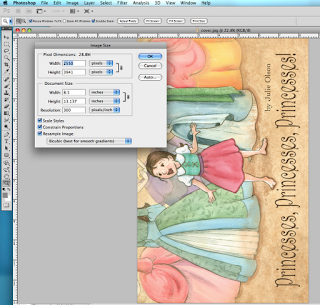
Step 1: Open each image in Adobe Photoshop. Resize all of your images to fit within a space 2550 pixels wide by 3242 pixels high, set at 300 dpi. (ignore the screen shot numbers below, just fill in what I specified)
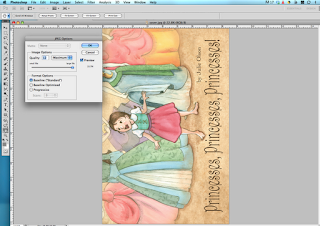
And save as jpg images (do not check the progressive scan option, baseline standard jpg is what you choose).
I had to rotate my images 90 degrees counter clockwise because I wanted it to look like a real horizontal picture book spread and not a single vertical page. Then the viewer using the Nook just turns the device horizontal to read instead of vertical.
Save all the images in one folder. I named my folder NookKindle because youll use the same images for each device. And make sure the files are named so they are in the correct order. For example, I named mine cover, page01, page02, page03 etc.
Make sure there are no glitches or spelling or formatting errors in your images before moving on.
Step 2: Open Adobe InDesign CS5 (or you can try it in an earlier version...post in the comments if these steps still work for you).
- Press COMMAND N (cmnd N) for a new document. And Click OK.
- Press cmnd D to place an image on the page.
- Choose your file (start with cover.jpg or whatever you named your cover). Click Open
- A thumbnail image will show up with a little brush. Drag it to the upper left corner and line up with the reddish purple margin and CLICK the mouse button. Itll end up looking like this...going off the page. LEAVE IT as it is. Do not worry. Itll all work out.
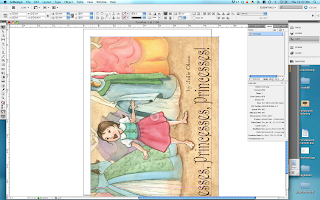
- Save it by pressing cmnd S. Put the files all into a separate folder so they are easy to access later.
- Do each of the above steps again and again until youve saved each of your images as a separate .indd document.
- Go to File/New/Book or choose Book from the main InDesign Menu Panel and name your book file and click Save
- In the pop-up window, press the + symbol on the lower right to add your content to the book.
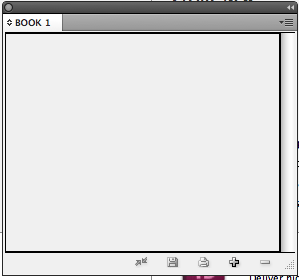
- You can select all the files at once by clicking and holding down the shift key, just make sure they are in the order you want them. Then click Open.
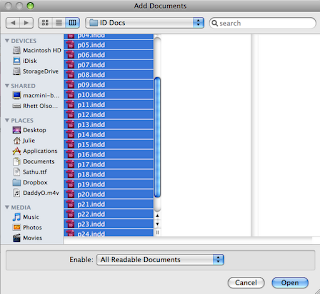
- Save the Book file you just created by clicking the disk icon in the open panel which includes your book files.
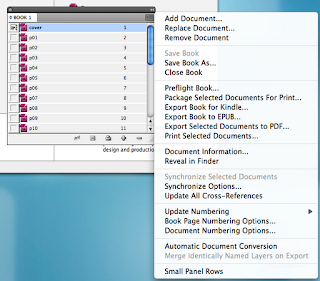
- Heres where my instructions again vary from VonLogans. Thankfully, its simpler. Click on the small dropdown menu icon in the upper right corner of the book files panel. Click Export Book to EPUB... and save it under yourbooktitle.epub
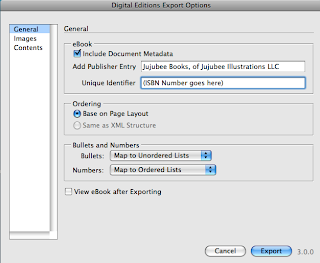
- In the "Digital Editions Export Options" panel, under General, you can include data such as your name or company name under publisher and an isbn number if the book has it (those can be purchased but are not necessary)
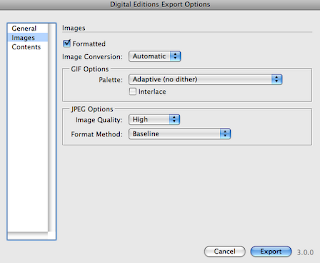
- Then click Images on the left and change the jpg size option to High instead of Medium.
- Click Export
Your book is now ready to upload and sell on the Nook. Go to http://pubit.barnesandnoble.com , create an account, and upload your book. It takes longer to get through the review process for Nook than for Kindle...a full 72 hours. But thats not too bad. Have your bank account numbers and tax id numbers ready when you create your account.
Creating a Kindle picture book
Now that youve created your book for Nook, creating the Kindle book will be easy. You already have all your files ready and in InDesign. If you didnt follow those steps, follow steps 1-3 under Creating a Nook Book. Then, follow the next few steps and itll be up on Kindle in less time than on the Nook.
Step 1: Download the Kindle plugin for InDesign here
You must be running Mac OSX 10.5 or later and InDesign version CS4 or later
Step 2: Open your Book.innd file or if you didnt save it, follow step 3 under the nook instructions above.
Step 3: Export to MOBI for Kindle
- Click Export Book for Kindle... and save it under yourbooktitle.mobi . Click Save.
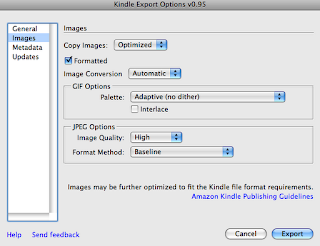
- Click Images on the left and change the jpg size option to High instead of Medium.
- Click Metadata on the left and fill in the information.
- Click Export
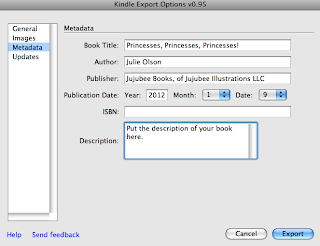
You now have your Kindle compatible file to upload.
Go to kdp.amazon.com (kindle direct publishing) and create a publisher account. Again youll need all account and tax info handy. Word of caution, they will try to get you to sign up for KDP select. I chose not to because of the exclusivity for 90 days. Just an FYI.
There are many options to review (more than for Nook) concerning royalties, digital rights management etc. I cannot tell you what to do here, except that you should read each thoroughly and then make your choice.
FINALLY the easiest one to create...
Creating a PDF downloadable Picture Book
Step 1: Resize all of your images to fit within 865 pixels wide by 562 pixels high at 72 dpi. These will need to remain horizontal as youd want to view them in a normal pdf reader. In this version of your ebook, what you see is exactly what you get. Then Save each image as a jpg in a folder labeled PDF with names that will keep them in the proper order.
Step 2: Open Adobe Acrobat Pro
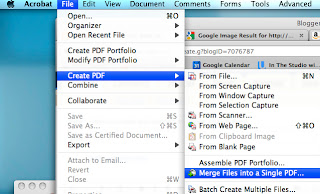
- Click File/Create PDF/Merge Files into a Single PDF...
- Click Add Files and Add Files again, Select the files and click Add Files.
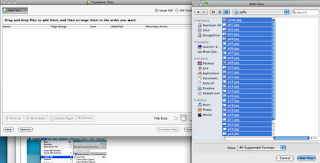
- Make sure they are in the right order and click Combine Files.
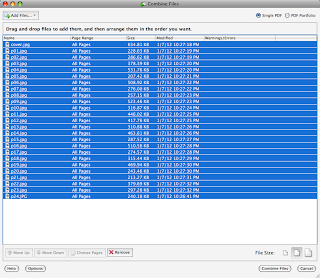
- And when the next window pops up, just save the file as YourBookTitle.pdf
- Scroll through the document and make sure it looks how you want it to look (it should if youve prepped it right and then followed the steps).
- If there are no changes, YOU ARE DONE! Your PDF is ready to upload for sale.
PDF books open in any pdf reader, on computers, on smartphones, tablets, etc. Its nice to make sales this way because no one takes a cut of the profit. You can sell them off your blog, webpage, etc. and use paypal as the money changer. However, I just chose to upload mine to another illustrators store that she has set up and link to it off my blog. I highly recommend it. Go there and click "create an account" at the upper right. Nice and simple.
Heres the link...
THE ILLUSTRATED SECTION
If you appreciate this tutorial, I would greatly appreciate positive reviews of my ebook on Nook, Kindle stores and even a download or two of the book. ;-)

How to QUICKLY become a designer or developer
How to QUICKLY become a designer or developer
The complete live online course to QUICKLY become a designer or developer, in short time.
Thanks.
Details here:
https://www.facebook.com/freelance.champ/photos/a.1629122967312156.1073741828.1629119907312462/1629122913978828/?l=f463ef55f7Our Mission:
To train and guide people of all ages to be the next great Freelance Designer or Developer or Marketer. The complete live online course will show you each and every step to be a successful freelancer and steps to get and maintain a consistent income stream. Also step by step planning & strategy to become a designer or developer quickly, in short span of time.Thanks.
glitter hello kitty wallpaper
glitter hello kitty wallpaper
Now we will share about glitter hello kitty wallpaper
Let See This Picture Of glitter hello kitty wallpaper
If you want to download glitter hello kitty wallpaper , save the image now.
Download this picture for free in HD resolution. glitter hello kitty wallpaper is HD-quality images, and can be downloaded to your personal collection.
You can also find the latest images of the glitter hello kitty wallpaper in the gallery below :

Start Purring with the Samsung GALAXY Y Hello Kitty. Furthermore, the customized Hello Kitty ringtone and wallpaper will give users an added dimension ... giving the event a touch of glamour and glitter. The Samsung GALAXY Y Hello Kitty Limited Edition has been available since 26 November 2012 and ...
Source:http://www.clipartbest.com/cliparts/dc8/5Kr/dc85Krpce.gif

5 things to do this weekend, (mostly) out of the rain. The Seattle Center museum kicks off its �Hello! Exploring the Supercute World of Hello Kitty� exhibit on Saturday and Sunday ... by staying inside the lines of parrots, William Morris wallpaper, Tiffany lamps and sea creatures. Join others at the ...
Source:https://blogger.googleusercontent.com/img/b/R29vZ2xl/AVvXsEgbAfCmN3j-avov-qV3a6WtRjQMMpIQzFxjhBP2HjotAhgRGK__neQv3UAK4ljLB2cjolZ5hpUNlg7einzrgaqlARFAgVDwREiYDt8LpD_FJRQGZ1JQZ39-lHBr6JVLVsCaQO_hFtUWCcbR/s1600/hello+kitty+free+wallpaper+%25282%2529.jpg

Best Practical Jokes at Work. Laina Gauker says they�ve covered co-workers� offices with aluminum foil, messed with display settings, filled offices from floor to ceiling with beach balls and even remodeled an office with pink wallpaper and Hello Kitty d�cor. But, when operations ...
Source:http://boutiquebabygif.unblog.fr/files/2009/09/hellokitty.gif

Little Twin Stars. Little Twin Stars Mini Letter Set: Floral in New. Timeline Photos - Little Twin Stars. Tasmia Tasin - K-pop or Korean. Little Twin Stars accessories tray (stars) SANRIO from Japan. Timeline Photos - Sanrios Hello Kitty Global. Little Twin Stars Plug ...
Source:http://www.pageresource.com/wallpapers/wallpaper/hello-kitty-for_608374.jpg

Feline frenzy with new Hello Kitty-themed rooms. Each room is completely decked out in Hello Kitty-related decor, from the wallpaper to the TV frame to the mirror. Even amenities such as towels and tissue boxes are adorned with Hello Kitty prints. Guests will also receive a welcome bag with items such as ...
Source:http://funcraftskids.com/wp-content/uploads/2015/01/minion-party-ideas.jpg
Thanks for viewing and Hopefully these images of glitter hello kitty wallpaper inspire you.
GBWhatsApp v1 25 v6 25 LATEST Extreme MOD APK Download
GBWhatsApp v1 25 v6 25 LATEST Extreme MOD APK Download

GBWhatsApp v1.25 (v6.25) Extreme MOD APK Download
* Update ** GBWhatsApp Extreme v1.25 *
* Personal editions *
* Modified Sola (Sumer Daemon) *
Whats new in GBWHATSAPP version EXTREME v1.25?
? (exclusive) Add the option to block access to Web Alwatsab (goodbye to spy through WhatsApp and Ab)
? (exclusive) Add the option to block access to archived conversations
? (exclusively) the possibility ofhiding cases box seen in the interface Alsturi / case
? possibility of masking non - cases box important in the interface Alsturi / case
? Add the option to change theinterface Alwatsab to 2014 the old interface
? Add the option to prevent theemergence of a notice while listening to audio recordings
? Add privacy options in the custom list (Khiaraat .adavat and properties. Privacy)
? Add other options to mute theconversation (hour , 12 Hours, 36 Hours, Month, Forever)
? Ability to install 100 conversations on the home screen instead of 25
? Add multiple chat option (open more than one conversation in the list of recently used apps)
? Ability to put a video in the status / history up to 30 minutes instead of 7 minutes
[ New ] Base Updated to 2.18.9
[ Super Exclusive ] AutoReply (Auto Message when you are Busy)
[ Enabled ] Search Participants
[ Enabled ] Manage Group Admins
[ Enabled ] Group Settings (Server Sided)
[ Added ] 7 New Conversation Bubbles
[ Added ] 4 New Ticks
[ Added ] 16 New Notifying Bar Icons
[ Added ] 5 New Launcher Icons
[ Added ] Option to Hide Admin Caption in Group (Mod 1.2.64)
[ Added ] Option to Color Admin caption in Group (Mod 1.2.65)
[ Added ] Hindi Language (Indian Language)
[ Fixed ] Hidden Message showing in Widget
[ Fixed ] Hidden Chat Opening from Widget
[ Fixed ] Able to call Hidden Chat From Group
[ Fixed ] App Opening from Widget even when Locked
[ Fixed ] Showing Hidden Chat when try to Share from Gallery or File Manager.
[ Fixed ] Hidden Chat Opening from Dialer
[ Fixed ] Hidden Opening From Phone
[ Fixed ] Crash On Some Devices
Many More Fixes...
Important Note -
1. We know many are Excited for WhatsApp Payments... But unfortunately not available in this Base... We will surely bring it soon to GB hence Do not ask for Base Update.
2. MOD is very Much Stable so request you to kindly check from your end before Posting anything.
3. All the themes sent from InApp will be uploaded to OSMThemes App.
This app has no advertisements
Screenshots

Instructions
- Download the file from any of the provided links.
- Uninstall any previous versions of GBWhatsapp Extreme.
- Install as a normal apk.
- Open, Close and Open Again.
- Enjoy!
Downloads
File Type: APK (GBWhatsApp v1.25 (v6.25) Extreme)
File Size: 35.1MB
Version: 1.25
Download APK Link #1
Download APK Link #2
Gloud Game Game Ps3 Ps 4
Gloud Game Game Ps3 Ps 4
Download Gloud Game Ps3 dan Ps4

Gloud game adalah emulator game PC,Ps3,Maupun Ps4
Dengan menggunakan Emulator Gloud Game kalian Bisa bermain Game Ps3,Ps4, Secara Gratis Cuma bermodal Internet
Dan untuk Menggunakan Emulator Ini di perlukan Koneksi Internet Yg stabil ,,contohnya Harus Menggunakan Sinyal 4g
Langsung Saja di download
Link:[Download]
Sekian Pembahasan Saya Baca juga Artikel saya Yg lain Sekian Terima Kasih
Klo Mau request Film,Game tulis saja di komen.
Cara Untuk Menuju Link Download
Klik Visit Link Tunggu 5 Detik Lalu Klik GET LINK
Sekian Terima kasih sudah Mampir
Subscribe to:
Posts (Atom)